Sublime Text 2 Cheatsheets
They say that a workman is only as good as his tools, and the same is true for a web developer.
The more you know about the tools, the better you'll get at performing the task at hand. There are now many tools that can speed up web development - from Browser Developer Tools to build scripts like Grunt; but the most important tool of all is the tool you write your code in - your code editor. For me, that's Sublime Text 2 and there are a ton of keyboard shortcuts available to make life easier available.
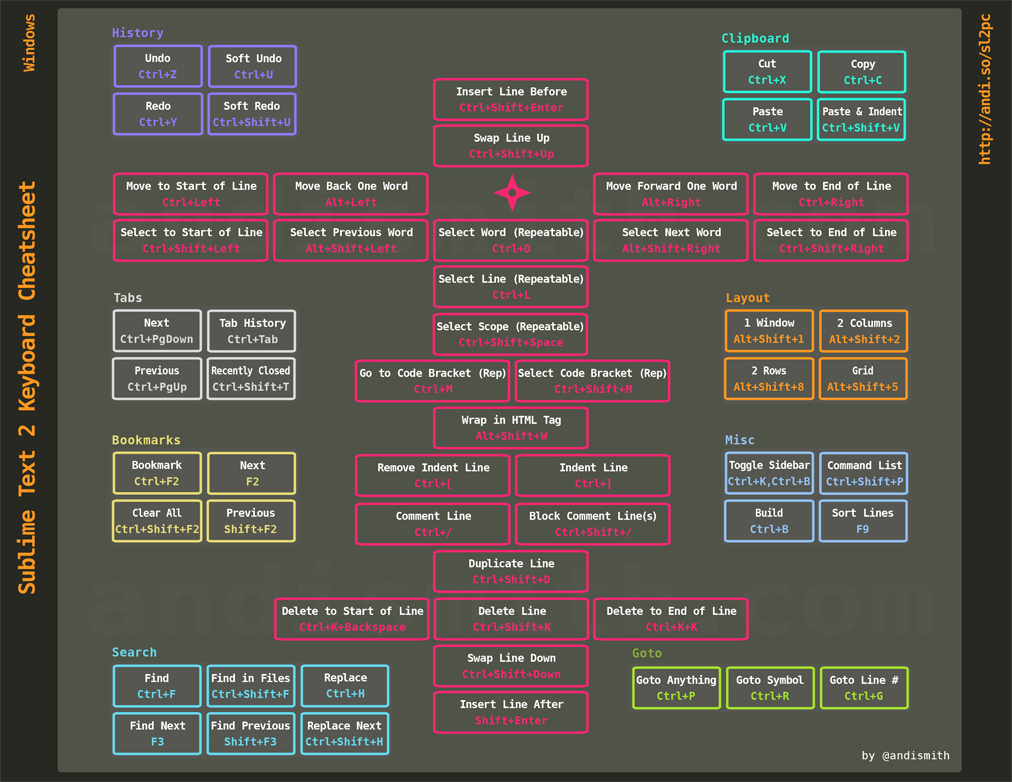
So as my Christmas present to you, here are 2 cheatsheets (one for Mac, one for Windows) so you can learn and reference those shortcuts to improve yourself and your developer skills.
PC (click thumbnail to open):
MAC (click thumbnail to open):

Have a great Christmas everyone!

By Andi Smith
More Blog Posts
Don't Lose Your Head
There's no doubt that AI is making us all faster at our jobs. But what is it doing to our judgement?
Deckchair Vibes
Last week I built and shipped a browser game from a deckchair in Ibiza using nothing but my phone and AI. No laptop. No IDE. No terminal. Just Claude, GitHub and Netlify.
Measure Shipped Work, Not Tokens
If everyone on your team uses AI every day, what does your AI adoption metric actually tell you?
AI to Resolve Incidents
We put an AI bot between our alerting and our on-call engineer. It reads the logs, the traffic and the recent deploys, then comments on the incident before anyone has even opened Slack.